Speak
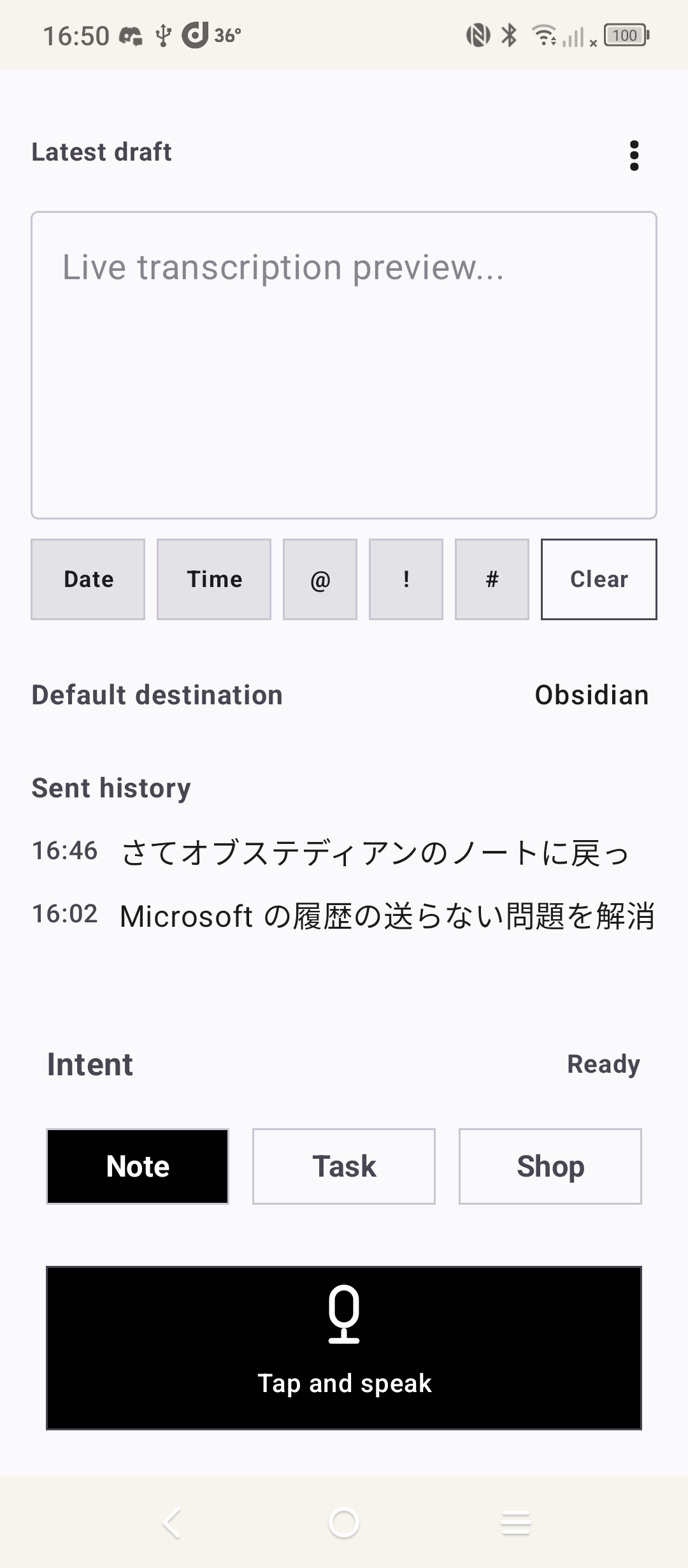
Tap once and say it while it is still clear. Your device's own speech engine writes it down — no upload, no waiting on a server.
ANDROID BETA LIVE · iOS IN DEVELOPMENT
Talk to Action is the front door to your second brain. Tap once, say the thought, and it lands in Obsidian, Google Keep or your clipboard — without opening a single one of them.
A fast voice capture inbox for the tools you already use — available on Android today.
Free · No account · No sign-up · 16 MB APK · Google Play listing lands after developer verification
01 / The moment of capture
By the time you have unlocked the phone, found the right app, waited for it to load and decided which folder this belongs in, the thought is gone. Every note-taking system on earth is downstream of one question: how fast can you get it in?
02 / The flow
Tap once and say it while it is still clear. Your device's own speech engine writes it down — no upload, no waiting on a server.
You get an editable draft, already tagged Note, Task or Shop by an on-device classifier. Wrong guess? One tap fixes it. Capture never waits for sorting.
Fire it at the destination that keeps the work moving — your vault, your list, your clipboard, or an AI you want to think out loud with.
03 / Your capture layer
Talk to Action doesn't want to replace your vault — it wants to feed it. Captures are appended straight into your daily note through Obsidian's own URI handler, with your date and time format, in the folder you already use. Not a share-sheet dump. A real append.
Different route per category, too: Notes to your daily note, Shop to your shopping list, Tasks wherever tasks live.
Obsidian is a trademark of Dynalist Inc. Talk to Action is an independent project.04 / The system behind the capture
Talk to Action is not another place to keep information. It is the fast, quiet entrance that feeds the system you already use to remember, retrieve, and think.
Personal knowledge workflow


Catch the raw thought before it fades. It enters the vault you trust, where it can become durable context for the questions you explore with Claude.
Living research workflow


Keep a running document of ideas, meetings, and observations. Add it to NotebookLM or Gemini Apps when you want grounded research, synthesis, and a conversation with your own sources.
Brand marks identify products that can sit alongside a Talk to Action workflow. Talk to Action is independent and is not affiliated with or endorsed by their owners.
05 / One inbox, many exits
Your thought should land wherever the next step belongs. Choose the destinations you use, then send without rebuilding the thought in every app.
17 destinations are ready today. A destination only receives text when you choose to send it there — nothing syncs in the background.

A pause, before the system
Capture is only the first movement. The next is choosing the system that can turn one clear thought into context, action, or a better question.
06 / Platforms
Both apps are written natively — Kotlin on Android, SwiftUI on iOS — because the speech engine and on-device processing live deep in each OS. No cross-platform shell.
Beta available now
In active development
07 / The honest comparison
So the real question is what a dedicated capture app earns you. Here is the case, stated plainly.
| What you want | Keyboard dictation | Assistant Siri / Google |
Talk to Action |
|---|---|---|---|
| Start without choosing an app first | No — open the app, then dictate | Partly | Yes — one tap, then talk |
| Edit before it is committed | Yes | Rarely | Yes — always an editable draft |
| Land inside Obsidian | Manual copy-paste | No | Direct append |
| Sorted into note / task / shopping | No | Fixed to its own apps | On-device, one-tap correction |
| Several destinations at once | No | No | Yes (Pro) |
| Works with no account | Varies | Needs the platform account | Yes |
08 / Privacy
Recording, transcription and classification all happen on your phone. There is no Talk to Action server, no account, and no analytics profile. Text leaves the device only when you send it, and only to the destination you picked.
09 / Pricing
The complete loop — speak, transcribe, correct, send — is free forever, with no time limit and no account. Pro is for people who route to more than one place.
$0
Forever. No sign-up.
Not yet on sale
Arrives after the Play release.
10 / Questions
It's the same build that goes to Google Play, signed with the same release key — Play verification is an account formality, not a code review we failed. Android will still ask you to allow installs from your browser, which is the system working as intended. If you'd rather wait for the Play listing, join the tester list and you'll get the link the day it opens.
It already builds and runs on a physical iPhone. What's left is matching the Android app screen for screen, then real-device testing, then TestFlight. No date is promised until parity testing passes — join the iOS list and you'll hear the moment it does.
Capture, transcription and sorting do, as long as your device's speech engine has its offline language pack. Sending to a local destination like Obsidian or the clipboard needs no connection either. Cloud destinations obviously need one.
Whatever your phone's voice input already handles — the app uses the OS speech engine rather than shipping its own, so it inherits that list. English and Japanese are what's been tested end to end so far; more are being verified before they're claimed.
Talk to Action is built for the next step after capture: review the transcription, choose or correct its type, then send it to the note, task, AI, or automation tool you use. A voice memo is simply recorded; this is prepared for action.
No. There's no sign-up, no profile and no server to hold one. Settings live on your device.
Get started
Install the Android beta now, or get one email when the iPhone build reaches TestFlight.
Google Play needs 12 testers running the app for 14 days before it can go public. If you capture into Obsidian and want the app to exist, this is the single most useful thing you can do — and you get every build first.
Put me on the tester list